 Richard Pikmets

Demand Gen is a visual Google Ads campaign type that helps you reach people on YouTube, Discover, Gmail, Maps and the Google Display Network. It isn’t a one-to-one replacement for Search or Performance Max: the campaign’s role depends on whether you want to reach people who are already searching, create new interest or optimise sales results across several channels.
In short
Search captures existing interest
Search ads work when a person already expresses a need through a search.
Demand Gen creates and sparks interest
The ad reaches people in visual environments before or outside a specific search.
Tracking has to stay business-focused
A cheap click isn’t a goal in itself. The campaign has to be tied to real conversions and customer value.
Demand Gen is a Google Ads campaign type whose logic is closer to visual, social-media-style advertising than to classic keyword-based Search. Google describes Demand Gen as a campaign that helps drive interest and action on YouTube, Discover, Gmail, Maps and the Google Display Network.
That makes the campaign type interesting mainly for businesses that don’t want to wait only for the moment someone types a specific need into Google. At the same time, the name “Demand Gen” doesn’t mean the campaign should only be used for brand awareness. Google also supports click-, conversion- and conversion value-based bidding strategies. So Demand Gen’s role can range from sparking initial interest to supporting sales or leads.
What is Google Ads Demand Gen?
Demand Gen is a visual campaign type where the advertiser combines the campaign goal, audience, creative assets, channel selection and bidding strategy. Google uses these inputs to find suitable impressions across its visual channels.
As of 15 September 2026, Google lists YouTube, Discover, Gmail, Maps and the Google Display Network as Demand Gen channels. You can leave channel selection automatic or use manual channel controls at ad group level. On YouTube, you can choose in-stream, in-feed and Shorts separately.
This means a “Demand Gen ad” isn’t one specific banner or one fixed YouTube format. The same campaign logic can use images, videos, carousel ads and, where suitable, a product feed across different channels.
Demand Gen vs Search vs Performance Max
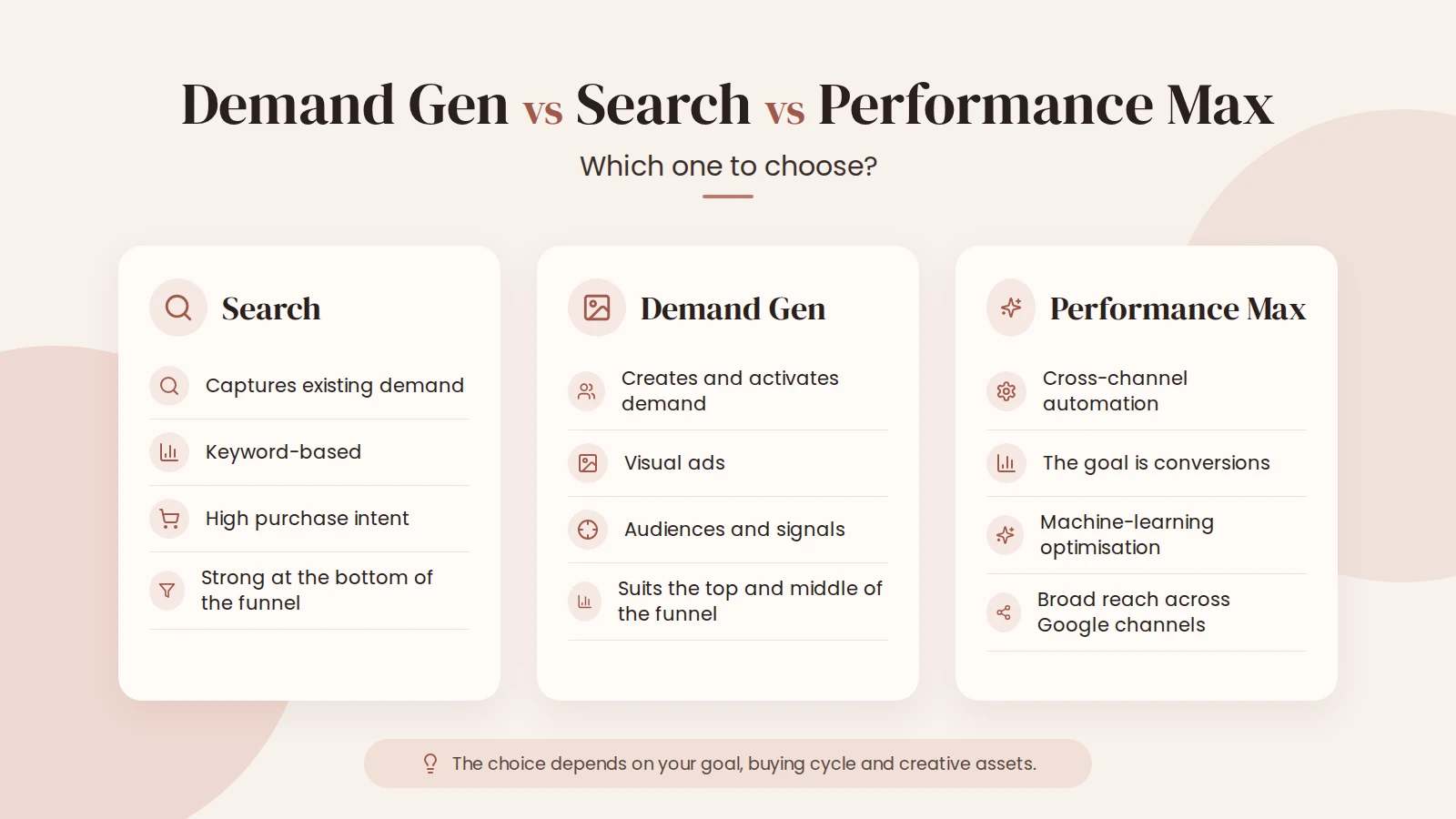
Don’t judge the three campaign types by asking “which one is best?”. The better question is what role each plays in the customer journey. Google’s own comparison separates them by their main job: Search reaches people who are already searching, Performance Max optimises results across Google’s channels, and Demand Gen focuses on creating interest and driving business results in visual channels.
| Campaign type | Main starting point | What you can control | When to consider it |
|---|---|---|---|
| Search | A person actively searches | Keywords, search terms, ads, landing page | When demand exists and people can express the need as a search |
| Demand Gen | The person’s interests, behaviour, first-party data and a visual message | Audiences, creative assets, channels, bidding strategy | When you want to create interest, do remarketing or support sales visually |
| Performance Max | A conversion or value goal across all Google channels | Asset groups, audience signals, budget and value-based optimisation | When the goal is to maximise results across all channels with one campaign |
If you want to understand the logic of Search first, see the practical guide to Search ads. Demand Gen isn’t a replacement for Search, because it doesn’t need an active search to show an ad.
Where do Demand Gen ads appear?
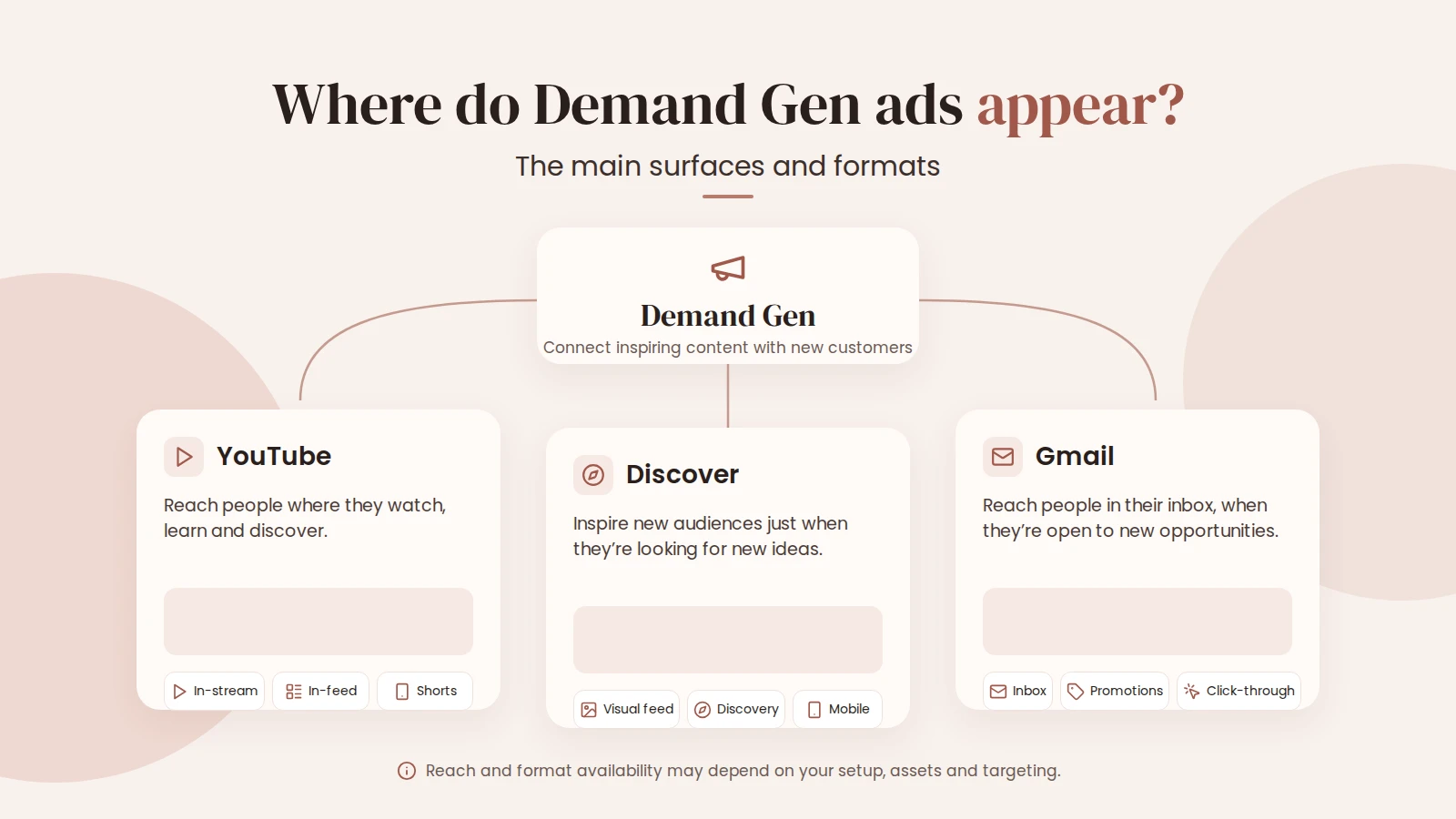
Google’s channel controls let you use all Google channels or choose channels manually. You can currently choose between these channels:
- YouTube in-stream;
- YouTube in-feed;
- YouTube Shorts;
- Discover;
- Gmail;
- Maps;
- Google Display Network.
Don’t choose channels just out of habit. For vertical video, for example, YouTube Shorts can be a very natural environment for that creative. At the same time, a product-based or visually strong offer may need a broader combination. Google offers channel reports at campaign, ad group and ad level, plus format segmentation for YouTube, which helps you see after launch where impressions actually happened.
Is Demand Gen replacing Google Display ads?
In 2026, Google is significantly changing the relationship between Display campaigns and Demand Gen. According to the official documentation, a phased migration tool launched in June 2026 that lets eligible advertisers move existing Google Display campaigns into Demand Gen. At the same time, Google still notes that creating new campaigns only through Demand Gen, and automatically migrating the remaining eligible campaigns, will come later.
In practice, this means comparing Display and Demand Gen is no longer simply “old vs new format”. Demand Gen is becoming the central framework for Google’s visual advertising, where you can use Discover, YouTube, Gmail and Maps as well as the Display Network, along with more varied creative formats and audience options.
Audiences: who does Demand Gen show ads to?
Demand Gen lets you use the usual Google Ads audience options, including remarketing lists, Customer Match first-party data, custom segments, interests, demographics and optimised targeting. Demand Gen also supports Lookalike segments, which aim to find new people who resemble an existing valuable first-party audience.
Choosing the audience shouldn’t be a standalone setting. If the creative speaks to beginners but the seed audience describes an existing high-value customer, the message and the audience contradict each other. The same applies to remarketing: the message for someone who has already viewed a quote should be different from the message for someone who has never come across the brand. The logic of audiences with previous contact is covered in more detail in the guide to remarketing.
What creative assets does Demand Gen need?
Demand Gen’s strength is using several visual formats. Google supports images, videos, carousel ads and product feeds in the campaign. Integrating the Google Display Network into Demand Gen also extends the use of Display-style formats, but whether a specific format fits depends on the channel and setup.
When planning creative, don’t think “how many files do I need?” but “which message hypotheses do I need to test?”. One visual might highlight the problem, another the result and a third a specific use case for the offer. A video has to work in both content and format in the channel where it’s shown.
- One clear core message. What should a person understand after seeing the ad?
- A format that suits the platform. A vertical Short isn’t just a horizontal video cropped narrow.
- Consistency between ad and landing page. The same offer and wording have to continue after the click.
- Testing several hypotheses. Test different approaches, not just small headline variations.
If the ad brings clicks but the page doesn’t move people forward, the problem isn’t necessarily the channel choice. Also check the landing page message, call to action (CTA), form and mobile experience.
Practical tip
Don’t build a Demand Gen campaign around channels or format alone. First set the business goal and tracking, then the audience, creative assets, channels and bidding strategy. That way you can later understand what actually affected the result.
Setting up a Demand Gen campaign step by step
1. Define the business result and primary conversion
Before creating the campaign, decide whether you mainly want good visitors, leads, purchases or conversion value. If the goal is an enquiry or a sale, the primary conversion used in Google Ads has to represent it as directly as possible. An intermediate action that’s too weak teaches the system to look for cheap actions, not necessarily good customers.
If your tracking isn’t reliable, it’s worth fixing before increasing the budget. For that, see the conversion tracking and setup service.
2. Decide the campaign’s role
Should the campaign reach a completely new audience, support existing Search, do remarketing or grow online shop sales? One campaign can have several effects, but optimisation decisions need one clear primary goal.
3. Choose channels deliberately
If you have enough budget and varied creative, it can make sense to let the campaign use all suitable channels. If you’re testing a specific format or want to know how, say, Shorts performs on its own, use manual channel controls. Change as few things as possible at once in a test, so you can understand the result later.
4. Build the audience on real business logic
Use first-party data, remarketing, custom segments or Lookalike segments depending on the campaign goal. Don’t add dozens of audiences just to make the campaign feel “precise”. Every extra restriction has to correspond to a real hypothesis.
5. Choose the bidding strategy by goal
For Demand Gen, Google lists Maximize clicks, Target CPC, Maximize conversions, Target CPA, Maximize conversion value and Target ROAS strategies, among others. Not every option may be available straight away in every situation or account, and value-based bidding has its own data requirements.
Choose the strategy based on what you want to optimise. If the main business goal is leads, cost per click isn’t a good end goal. If conversions have very different economic value, value-based optimisation can be substantially better than counting all conversions as equal.
6. Set a measurement plan before launch
At a minimum, look separately at ad spend, channel split, clicks or engagement, primary conversions, CPA or ROAS and, where possible, the actual quality of enquiries or customers. The result attributed in Google Ads matters, but in a service business the analysis should ultimately reach your CRM or sales results.
How to interpret CPA and ROAS is covered in more detail in the guide to ad campaign profitability.
When is Demand Gen a good choice?
Demand Gen is a good fit if…
- the product or service needs visual explanation;
- you want to reach people before a specific search;
- you have a working remarketing or Customer Match base;
- you have several genuinely different images or videos;
- conversion and lead quality can be measured.
Wait a while if…
- the offer or landing page is still unclear;
- the conversion signal doesn’t reflect real business value;
- the budget is already split across too many campaigns;
- there isn’t enough creative for testing;
- you don’t know how to judge the campaign’s success after launch.
Common Demand Gen mistakes
- The campaign has no clear role. It’s expected to build awareness, bring visitors, do remarketing and generate sales all at once.
- Every channel gets the same creative. One format may not work equally well in Shorts, Gmail and the Display Network.
- Success is judged only by clicks. A visual campaign can bring lots of cheap clicks, but business quality only shows at the conversion and sales level.
- Automation is expanded before tracking is checked. With the wrong primary conversion, automation grows the wrong action.
- Search, Demand Gen and Performance Max serve the same goal without a division of roles. Each campaign needs its own clear role.
- The Display migration is treated as a simple technical rename. Demand Gen brings new channels, creative formats and audience options that are worth reviewing deliberately.
Frequently asked questions
What is Demand Gen in Google Ads?
Demand Gen is a visual Google Ads campaign type that can show ads on YouTube, Discover, Gmail, Maps and the Google Display Network. It can be used to create interest, for remarketing, to get visits and, with suitable tracking, to support conversion goals.
Are Demand Gen and Performance Max the same thing?
No. Performance Max optimises results across Google’s channels as a single campaign. Demand Gen gives more control over the visual campaign, audience and channel selection, and is designed to create and spark interest in Google’s visual channels.
Can I choose where Demand Gen ads appear?
Yes. Google’s channel controls let the campaign use all suitable Google channels, or you can manually choose, for example, YouTube, Discover, Gmail, Maps or the Google Display Network at ad group level.
Is Demand Gen replacing Display campaigns?
Google is moving in that direction. Since June 2026, eligible advertisers can migrate existing Display campaigns into Demand Gen in phases. Google’s documentation notes that later, new eligible Display campaigns will be created through Demand Gen and the remaining eligible campaigns will be migrated automatically, but Google doesn’t currently confirm a universal end date.
What budget suits a Demand Gen campaign?
There’s no universal amount. The budget has to be enough to properly test the chosen audience, channels and creative hypotheses. Start from the value of the conversion you want, an acceptable CPA or ROAS and how many results you need to make a decision. To work out a starting point, you can use the Google Ads budget calculator.
Sources
- Google Ads Help: About Demand Gen campaigns
- Google Ads Help: Channel controls in Demand Gen campaigns
- Google Ads Help: Google Display Ads campaigns have a new home in Demand Gen
- Google Ads Help: Demand Gen campaign performance guide
- Google Ads Help: Demand Gen creative assets and product feed specifications
Demand Gen channels, bidding strategies and the Display migration were checked against Google’s official documentation on 15 September 2026. Google may change feature availability and the migration timeline.


